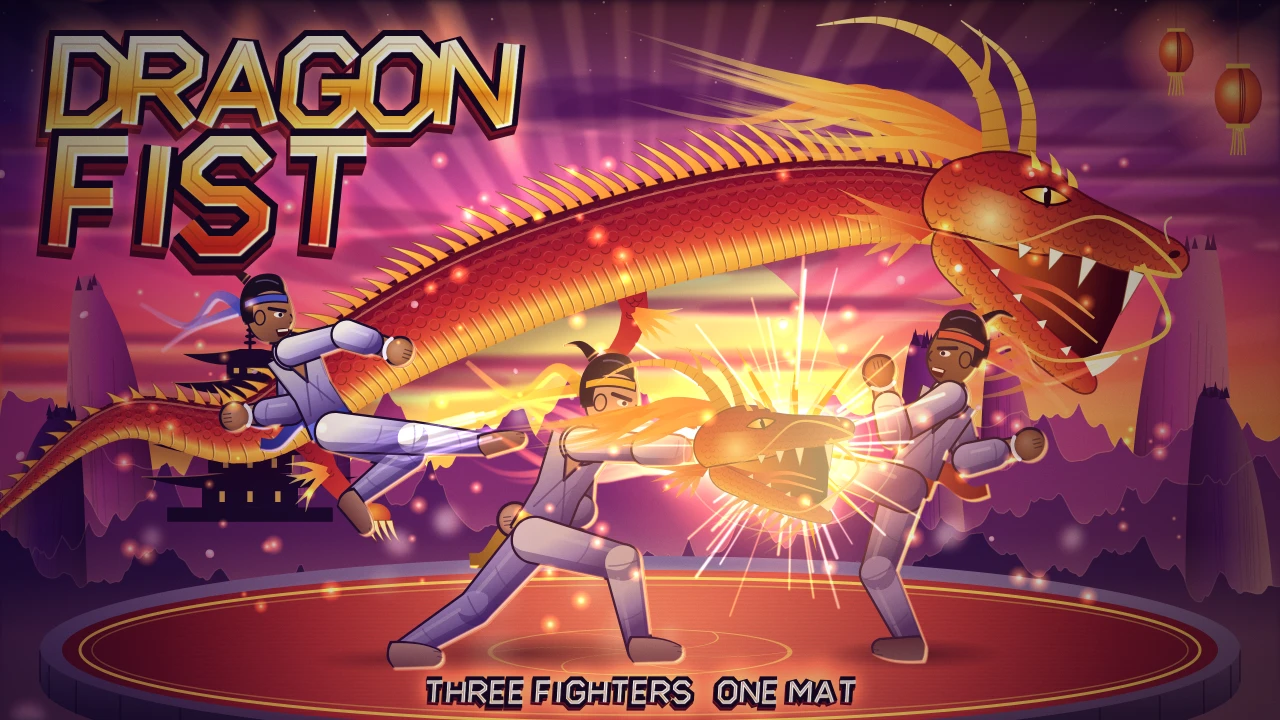
Key art: Sol throws a fire-wrapped punch as Ember leaps in with a flying kick and Indigo raises an open palm, on a crimson mat under a golden cloud dragon at sunset, with the Dragon Fist logo above.

Dragon Fist · Cover art

Out Now

Three-fighter karate

Dragon Fist

Three fighters, one mat, and a referee who counts every point.

Dragon Fist is a game for Windows PC: three-fighter karate. Play the free demo in your browser (three fighters, one courtyard, three modes), then get the full game for $1.99: one payment, no subscription, no account.

Karate with three fighters on one mat. Fourteen fighters, twelve courtyards, weapons and a sixteen-sash Circuit, with a referee who calls every half-point.

Full game$1.99
Free demoThree fighters, one courtyard, three modes
A good breakSixteen sashes, eight modes
Players1–3 local players
Game languageEnglish
Card and other methods, on Creem's checkout

You pay on the checkout page of the method you choose, then come back here to download.

Play free demo of Dragon Fist

$1.99 full game · One purchase, no subscription.

If a game does not run on your computer, or simply is not what you expected, you can ask for a full refund within 14 days of purchase. Refund policy

YOUR NEXT “ONE MORE GO”

What makes it fun.

You are the fighter in the gold sash, outpointing two rivals in a sunset courtyard where every half-point counts.

Share one mat with two rivals, who can strike from either side.

Fourteen fighters, fifty-five strikes and six weapons, with a Circuit of sixteen sashes.

An original score of sixteen themes, and a one-click Windows installer.

THE GAME

About Dragon Fist.

Dragon Fist is a karate fighting game built on the idea that three fighters on one mat is more fun than two. Every clean strike scores. A jab is worth a half-point, a roundhouse a full point, and the referee calls each one. A strike starts on the frame you press, so what you do is what happens.

Fourteen fighters from three schools bring nine fighting styles and fifty-five different strikes between them, and every fighter has a signature strike of their own. The Dragon Circuit climbs sixteen sashes from pearl to black across twelve courtyards.

Each courtyard has its own crowd and music, and five kinds of bonus round come up between the bouts. Armed bouts bring six weapons and thirty-six weapon strikes. A Daily Bout, a Gauntlet and a Training Dojo fill the rest of the eight modes. Up to three people can play at once on one screen.

The free demo gives you Sol, Ember and Indigo in Sunset Gate, with Three-Way Bout, Duel and the Training Dojo, and a Board Break round when you win.

THE STORY

The road to the Dragon Summit.

Every three years the Tournament of Ten Thousand Hands climbs the mountain road, one courtyard at a time, from the Sunset Gate to the Dragon Summit.

Anyone may enter, even in a borrowed sash. Only the best climb all the way to the summit.

Sol is a valley courier who learned to fight on the mountain roads. She walks up to the Sunset Gate with a borrowed sash, a good appetite and two questions: can she win the black sash, and who carved the dragon on the summit?

Twelve rivals wait along the way. Ember tumbles through the festivals, Willow makes lanterns on the quay, Basalt hauls stone, Velvet bows to everything and Obsidian has held the summit for three tournaments running.

A referee counts every point, the crowd keeps its own score and every bout ends with a bow or a fall.

The same tournament is told from another side in Kung Fu: Return of the Green Dragon Master, which shares this world, its courtyards and many of its fighters.

TRY A LITTLE. PLAY A LOT.

Get a taste of Dragon Fist.

FREE BROWSER DEMO

Three fighters, one courtyard, three modes

Learn the controls and play the opening. It costs nothing and needs no account.

  • Play straight in your browser
  • A short opening slice
  • Replay as often as you like
Play free demo of Dragon Fist

THE FULL GAME · $1.99

The rest of the game.

Fourteen fighters, twelve courtyards, eight modes, sixteen sashes, five bonus rounds and six weapons.

  • Everything past the demo
  • A Windows installer to keep
  • One price, no subscription
Card and other methods, on Creem's checkout

$1.99 full game · One purchase, no subscription.

BUYING AND INSTALLING

How buying Dragon Fist works

  1. Buy. Click Buy full game to pay on Creem's secure checkout. Creem is our Merchant of Record: it takes your payment, works out and collects any sales tax or VAT (you see the total before you pay) and sends your receipt. Creem appears as the seller on your receipt and card statement. We never see or store your card details. Or click Pay with PayPal and pay on PayPal instead. PayPal takes that payment and sends the receipt.
  2. Download. Right after payment you return to your order page here, and the Windows installer is ready. Your order page keeps working for at least 30 days, and reloading it gives you fresh download links.
  3. Install and play. Double-click the installer and Dragon Fist installs in one click. Windows may show a "Windows protected your PC" message the first time you open the installer. That happens because the installer is not code-signed. Choose More info, then Run anyway. It puts a shortcut on your desktop and opens in its own window. There is no launcher, account or online check.
  4. Not for you? If a game does not run on your computer, or simply is not what you expected, you can ask for a full refund within 14 days of purchase. Email support@snackbreakgames.com from your checkout address with the order number from your Creem or PayPal receipt. If you paid with Creem, it pays the refund back to your original payment method, and most banks show it within 5–10 business days. If you paid with PayPal, we send the refund back through PayPal.

THE FILE

What you download, in plain facts.

System requirements

System requirements for Dragon Fist
RequirementMinimumRecommended
Operating systemWindows 10 (64-bit)Windows 10 or Windows 11 (64-bit) with current updates
Processor64-bit (x64) processor with SSE3 supportDual-core 64-bit processor
Memory4 GB RAM8 GB RAM
GraphicsDirectX 11 graphics. Integrated graphics are enough.Integrated or dedicated graphics with current drivers
Free disk space400 MB1 GB
Display960 x 5401280 x 720 or larger
ControlsKeyboardKeyboard

Installed size: 285 MB, plus the 102 MB installer. In our own test on Windows 11 with integrated graphics, Dragon Fist used up to about 1030 MB of memory while playing.

Version
2.1.0
File
Dragon Fist Setup 2.1.0.exe (102.3 MB)
Checksum (SHA-256)
cdf31f1f9dc1bef4… The full value is on your order page. Check your download with Get-FileHash in PowerShell.
Works on
Windows 10 or newer (64-bit). One-click installer: no other software needed.
Installs
For your Windows user only. The installer does not ask for administrator rights.
Internet
Not needed to play. The installed game works offline.
Account and DRM
None. No launcher, account, subscription or online activation.
Your saves
Kept in your Windows user profile, so they survive updates and uninstalling.
Controls
Keyboard, Touch
Made by
Developed by Fire Dragon Interactive, published by Snack Break Games.
Windows warning
The installer is not code-signed, so Windows may show "Windows protected your PC". Choose More info, then Run anyway. The SHA-256 checksum lets you confirm the file is the one we published.

CONTROLS AND COMFORT

How it plays.

Arrow keys or A / D move, Up jumps, Down crouches, Z or J punches, X or K kicks and C or L guards. Two or three players can share one keyboard with keys of their own, and every key can be remapped for each player. On a phone the touch buttons cover the same set.

Each fighter's sash carries a pattern as well as a colour, with a larger-pattern setting, and outlines can be switched to high contrast. Flashes and screen shake can be turned down, and referee calls can be shown as captions. You can make the touch buttons larger, slow the game to 85% or 70%, and set the guard to hold or toggle. Music, effects, crowd and menu sounds each have their own volume. Scores and strikes are announced to screen readers. Difficulty has five levels.

PLAYERS SCORE IT

What players say about Dragon Fist.

Scores run from 1 (worst) to 10 (best). Only players who bought the game can rate it, and you can change your score later.

Player scores

No ratings yet.

Only players who bought Dragon Fist can rate it, from 1 to 10, once each. Refunded orders do not count.

Bought it? Rate it

Open your order page once and the score form appears here. Or enter your order reference to rate from this browser.

It is in the address of your order page (checkout_id=ch_…). If you paid with Creem, the order number on your receipt works too.

QUICK ANSWERS

Before your next break.

How much is Dragon Fist?+
Dragon Fist costs $1.99 (US dollars) as a one-time purchase with no subscription. The free browser demo costs nothing.
Can I trust buying Dragon Fist here?+
You pay with Creem, our Merchant of Record, or with PayPal, so we never see your card details. If you use PayPal, we never see your PayPal password either. The game is a DRM-free installer. Its file size and the start of its SHA-256 checksum are listed on this page. If it is not for you, you can ask for a refund within 14 days.
How does buying Dragon Fist work?+
Choose Buy full game to pay on Creem's secure checkout, or Pay with PayPal to pay on PayPal. You return to your order page, download the Windows installer, double-click it and open Dragon Fist from the shortcut on your desktop. It is a one-time purchase with no subscription.
What platforms does Dragon Fist run on?+
The full game is a one-click installer for Windows 10 or newer (64-bit). The free demo runs in a modern desktop web browser, including on macOS and Linux, so you can try it there first.
What are the system requirements for Dragon Fist?+
Dragon Fist needs Windows 10 (64-bit), a 64-bit (x64) processor with SSE3 support, 4 GB of memory and 400 MB of free disk space. DirectX 11 graphics. Integrated graphics are enough. The installed game takes 285 MB, and its window opens at 1280 x 720.
Does Dragon Fist need an internet connection?+
No. The installed game runs in its own window and works offline. The free demo loads from this website in your browser.
What if the installer does not run, or Windows shows a warning?+
Our installers are not code-signed, so Windows may show "Windows protected your PC". Choose More info, then Run anyway. If the game still does not run on your computer, email support@snackbreakgames.com and ask for a refund within 14 days.
Can I download Dragon Fist again?+
Yes. Your order page keeps issuing fresh download links for at least 30 days. After that, email support@snackbreakgames.com from your purchase address with your order number.
What happens to my saves if I uninstall Dragon Fist?+
Your saves stay in your Windows user profile, so they survive updates and uninstalling.
How long does Dragon Fist take to play?+
Sixteen sashes, eight modes. The free demo covers three fighters, one courtyard, three modes.
What can I play for free?+
The browser demo includes three fighters, one courtyard, three modes. Play it here before you decide about the full game.
What does the full game include?+
Fourteen fighters, twelve courtyards, eight modes, sixteen sashes, five bonus rounds and six weapons.
How do I play?+
Keyboard, Touch controls. Arrow keys or A / D move, Up jumps, Down crouches, Z or J punches, X or K kicks and C or L guards. Two or three players can share one keyboard with keys of their own, and every key can be remapped for each player. On a phone the touch buttons cover the same set.